
To Do List Backup

Alex (@alex)

42313

0

0

About This Space

No description provided.


Last updated on September 25, 2019

Public Permissions:   View   Open/Fork   Run   Comment  

Project Title

Your workspace is empty.

To add new files, select a file type from the New menu.
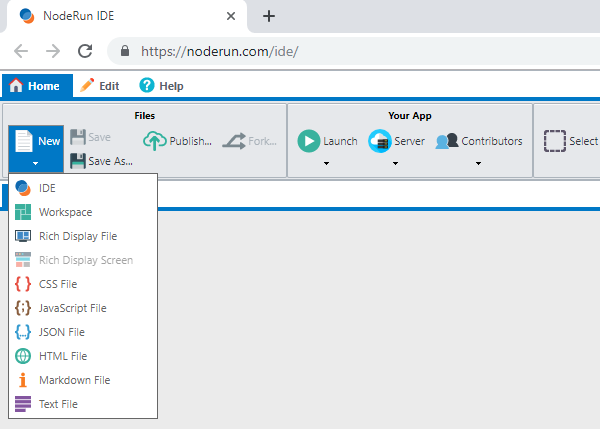
New Menu

To start the Visual Designer, select New -> Rich Display File.


To edit this README file, expand the panel on the left and update the markdown text.
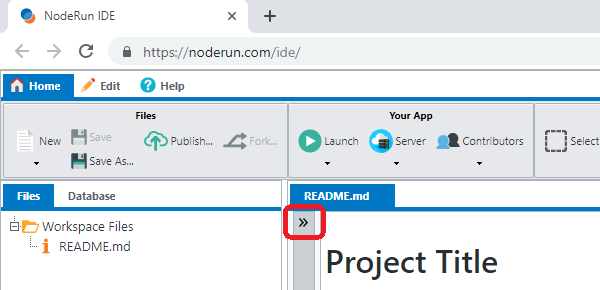
How to expand markdown

Be the first to comment:      

Comments

Write Preview Markdown: bold italic code link
Post

More Spaces By Alex (@alex)

Filters:

Popular Recent

React.js Application

53320

0

1

Basic setup for a Hello World React.js App

66255

0

2

React.js using Rich Display Components built in the Visual Designer

52996

0

1

React.js using Rich Display Components built in the Visual Designer

44295

0

0

React.js using Rich Display Components built in the Visual Designer

42999

0

0

React.js using Rich Display Components built in the Visual Designer

44308

0

0

34411

0

0

A simple dashboard example that uses responsive design

45830

0

0

A simple dashboard example that uses responsive design

45522

0

0

A demo of how to build and consume Web Services with and without parameters

49137

0

0

A demo of how to build and consume Web Services with and without parameters

47286

0

0

A demo of how to build and consume Web Services with and without parameters

46645

0

0