React.js Rich Display 3

About This Space
React.js using Rich Display Components built in the Visual Designer
Last updated on March 23, 2020
Public Permissions: View Open/Fork Run Comment
React.js + Rich Display Customer Lookup Template
This template illustrates the use of the React library with Rich Displays built using the browser-based Visual Designer in NodeRun.
Individual React components are configured as Rich Displays in the Designer and then assembled together using React JSX code. Node.js fetches the data for the components via REST API.
Rich Displays can signicantly simplify React application development because most components can be configured in a point-and-click manner, rather than coding markup manually.
To use Rich Display components in React, you simply utilize the
<RichDisplay /> component tag.
In this example, there are 2 Rich Display components:
<Customers />- lists the customers in a grid
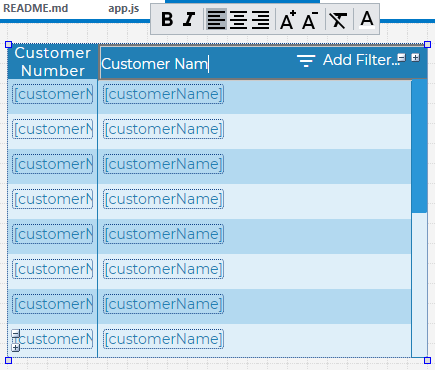
<CustomerPanel />- displays specific customer information in a panel
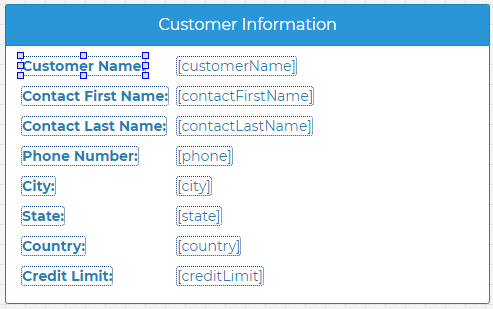
When a React application uses Rich Displays, maintaining the components becomes easy. For example, if you wanted to add additional grid columns, rearrange information on the panel, or add new widgets and data to a component, you can quickly complete those actions directly in the Visual Designer. When you click Save, your changes are immediately deployed without having to write any additional markup.
More Spaces By Alex (@alex)
48049
0
0
44039
0
0
44053
0
0
A demo of how to build Rich Displays in the Visual Designer that integrate with external CSS and JavaScript file
46847
0
0
A demo of how to build Rich Displays in the Visual Designer that integrate with external CSS and JavaScript file
50935
0
0
A demo of how to build Rich Displays in the Visual Designer that integrate with external CSS and JavaScript file
44655
0
0
A Hello World app with both dynamic output and input fields. Also illustrates the basics of animation.
47220
0
0
44644
0
0
44037
0
0
44812
0
0
44618
0
0
43011
0
0
Be the first to comment:
Comments